
บทที่ 7 การแสดงผลข้อมูลด้วยเว็บแอปพลิเคชัน
(Displaying Data Using Web Applications)
7.1 บทนำ
ในบทที่ผ่านมาได้ศึกษาการพัฒนา Web Application สำหรับรับข้อมูลจากผู้ใช้ผ่าน HTML Form และใช้ JavaScript ส่งข้อมูลไปยัง FastAPI เพื่อบันทึกลงฐานข้อมูล PostgreSQL เมื่อระบบสามารถจัดเก็บข้อมูลได้แล้ว ขั้นตอนต่อไปคือการนำข้อมูลที่อยู่ในฐานข้อมูลกลับมาแสดงผลบน Web Browse
การแสดงผลข้อมูลเป็นหน้าที่สำคัญของระบบสารสนเทศและระบบ Internet of Things (IoT) เนื่องจากผู้ใช้งานจำเป็นต้องสามารถตรวจสอบข้อมูลอุปกรณ์ ข้อมูลเซนเซอร์ หรือสถานะของระบบได้ตลอดเวลา
ในบทนี้จะศึกษาการอ่านข้อมูลจากฐานข้อมูลผ่าน FastAPI การส่งข้อมูลกลับในรูปแบบ JSON และการใช้ JavaScript แสดงผลข้อมูลบนหน้าเว็บ
ภาพรวมของการทำงานสามารถแสดงได้ดังนี้
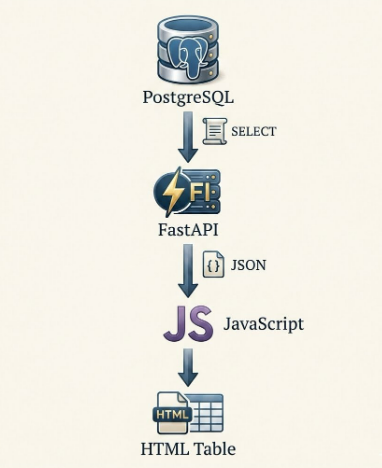
จะเห็นว่าทิศทางของข้อมูลแตกต่างจากบทที่ 6 ซึ่งเป็นการส่งข้อมูลจาก Client ไปยัง Server ส่วนบทนี้เป็นการอ่านข้อมูลจาก Server กลับมายัง Client
7.2 สถาปัตยกรรมของระบบแสดงผลข้อมูล
ระบบที่พัฒนาขึ้นประกอบด้วยองค์ประกอบหลัก 4 ส่วน ได้แก่
- PostgreSQL สำหรับจัดเก็บข้อมูล
- FastAPI สำหรับให้บริการข้อมูลผ่าน REST API
- JavaScript สำหรับร้องขอข้อมูลจาก Server
- HTML สำหรับแสดงผลข้อมูลบน Browser
การทำงานเป็นดังนี้
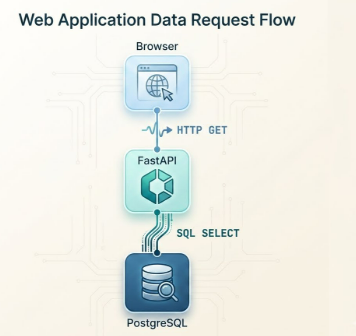
เมื่อ FastAPI ได้รับข้อมูลจากฐานข้อมูลแล้ว จะจัดรูปแบบข้อมูลให้อยู่ในรูปแบบ JSON และส่งกลับไปยัง Browser
7.3 การสร้าง REST API สำหรับอ่านข้อมูล
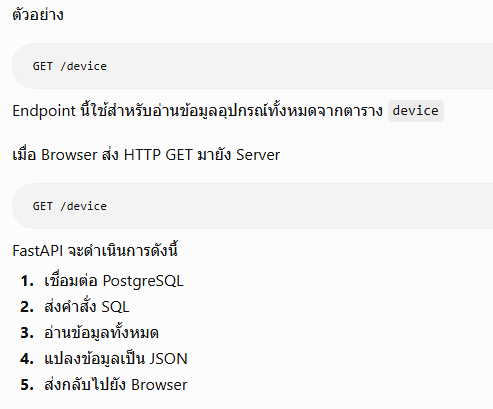
FastAPI สามารถกำหนด Endpoint สำหรับอ่านข้อมูลจากฐานข้อมูลได้
7.4 การอ่านข้อมูลจากฐานข้อมูล
FastAPI ใช้คำสั่ง SQL
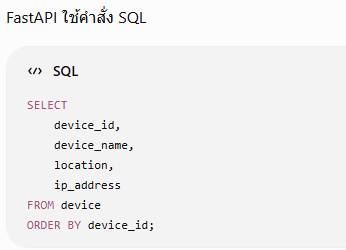
จากนั้น FastAPI จะสร้าง JSON
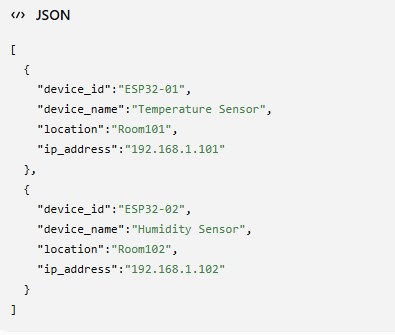
โดยการอ่านข้อมูลจากฐานข้อมูล ตาราง device ผ่าน FastAPI แล้วแสดงผลในรูปแบบตาราง มีขั้นตอนดังนี้
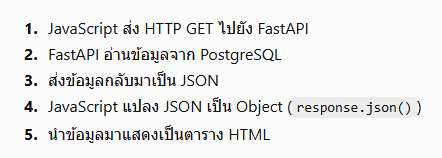
ตัวอย่างการอ่านข้อมูลจากฐานข้อมูลของตาราง device
โดยต้องมีการพัฒนาโปรแกรม 2 ฝั่งคือ 1.ฝั่ง serever ที่ทำหน้าที่ค้นหาข้อมูลจากฐานข้อมูล 2.ฝั่ง Client แสดงผลข้อมูลบนเวปบราวเซอร์
ตัวอย่างโค้ดสำหรรับฝั่งเซอร์เวอร์สำหรับการติดต่อกับฐานข้อมูล มีดังนี้
    from fastapi import FastAPI
from fastapi.middleware.cors import CORSMiddleware
from pydantic import BaseModel
import psycopg

# -------------------------
# FastAPI
# -------------------------

app = FastAPI()

# -------------------------
# CORS
# -------------------------

app.add_middleware(

    CORSMiddleware,

    allow_origins=["*"],

    allow_credentials=True,

    allow_methods=["*"],

    allow_headers=["*"]

)

# -------------------------
# PostgreSQL
# -------------------------

conn = psycopg.connect(

    host="localhost",
    dbname="iot_database",
    user="postgres",
    password="**********",
    port=5432

)

print("เชื่อมต่อ PostgreSQL สำเร็จ")

# -------------------------
# JSON Model
# -------------------------

class Device(BaseModel):

    device_id: str
    device_name: str
    location: str
    ip_address: str


# ==========================================================
# POST : เพิ่มข้อมูลอุปกรณ์
# ==========================================================

@app.post("/device")
def add_device(device: Device):

    try:

        with conn.cursor() as cur:

            cur.execute(
                """
                INSERT INTO device
                (
                    device_id,
                    device_name,
                    location,
                    ip_address
                )

                VALUES
                (%s,%s,%s,%s)
                """,

                (
                    device.device_id,
                    device.device_name,
                    device.location,
                    device.ip_address
                )

            )

        conn.commit()

        print("บันทึกข้อมูลสำเร็จ")

        return {

            "status":"OK",
            "message":"บันทึกข้อมูลสำเร็จ"

        }

    except Exception as e:

        conn.rollback()

        print(e)

        return {

            "status":"ERROR",
            "message":str(e)

        }


# ==========================================================
# GET : อ่านข้อมูลทั้งหมด
# ==========================================================

@app.get("/device")
def get_device():

    try:

        with conn.cursor() as cur:

            cur.execute(
                """
                SELECT

                    device_id,
                    device_name,
                    location,
                    ip_address

                FROM device

                ORDER BY device_id
                """
            )

            rows = cur.fetchall()

        device_list = []

        for row in rows:

            device_list.append({

                "device_id": row[0],
                "device_name": row[1],
                "location": row[2],
                "ip_address": row[3]

            })

        return device_list

    except Exception as e:

        print(e)

        return {

            "status":"ERROR",
            "message":str(e)

        }
ทำการบันทึกเป็นไฟล์ server_fastAPI_get.py และรันโปรแกรม ด้วยคำสั่ง uvicorn server_fastAPI_get:app --reload
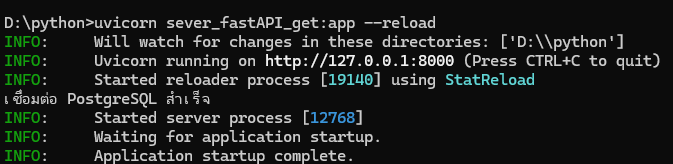
และฝั่ง Client ให้สร้างไฟล์ตามโค้ดในตัวอย่างนี้
    <!DOCTYPE html>
<html lang="th">

<head>

    <meta charset="UTF-8">

    <meta name="viewport"
          content="width=device-width, initial-scale=1.0">

    <title>Device List</title>

    <style>

        body{

            font-family: Arial, Helvetica, sans-serif;
            margin:40px;
            background:#f5f5f5;

        }

        h2{

            color:#003366;

        }

        table{

            width:100%;
            border-collapse:collapse;
            background:white;

        }

        th{

            background:#003366;
            color:white;
            padding:10px;

        }

        td{

            border:1px solid #cccccc;
            padding:8px;
            text-align:center;

        }

        tr:nth-child(even){

            background:#eeeeee;

        }

        button{

            padding:10px 20px;
            font-size:16px;
            margin-bottom:20px;

        }

    </style>

</head>

<body>

<h2>รายการอุปกรณ์ IoT</h2>

<button onclick="loadDevice()">

โหลดข้อมูล

</button>

<table>

<thead>

<tr>

<th>ลำดับ</th>
<th>Device ID</th>
<th>Device Name</th>
<th>Location</th>
<th>IP Address</th>

</tr>

</thead>

<tbody id="deviceTable">

</tbody>

</table>


<script>

async function loadDevice(){

    try{

        //------------------------------------------------
        // เรียก FastAPI
        //------------------------------------------------

        const response =
            await fetch("http://127.0.0.1:8000/device");


        //------------------------------------------------
        // JSON -> JavaScript Object
        //------------------------------------------------

        const devices =
            await response.json();


        console.log(devices);


        //------------------------------------------------
        // สร้างตาราง
        //------------------------------------------------

        let html="";

        devices.forEach(function(device,index){

            html +=

            "<tr>"+

            "<td>"+(index+1)+"</td>"+

            "<td>"+device.device_id+"</td>"+

            "<td>"+device.device_name+"</td>"+

            "<td>"+device.location+"</td>"+

            "<td>"+device.ip_address+"</td>"+

            "</tr>";

        });


        //------------------------------------------------
        // แสดงผล
        //------------------------------------------------

        document.getElementById("deviceTable").innerHTML=html;

    }

    catch(error){

        console.log(error);

        alert("ไม่สามารถเชื่อมต่อ FastAPI ได้");

    }

}

</script>

</body>

</html>
ให้บันทึกเป็นไฟล์ HTML แล้ว รันโปรแกรม จะได้ดังรูป

ให้กดปุ่ม โหลดข้อมูล เพื่อร้องขอข้อมูลด้วย Method GET ไปยังเซอร์เวอร์ จะได้ข้อมูลแสดงผลดังรูป
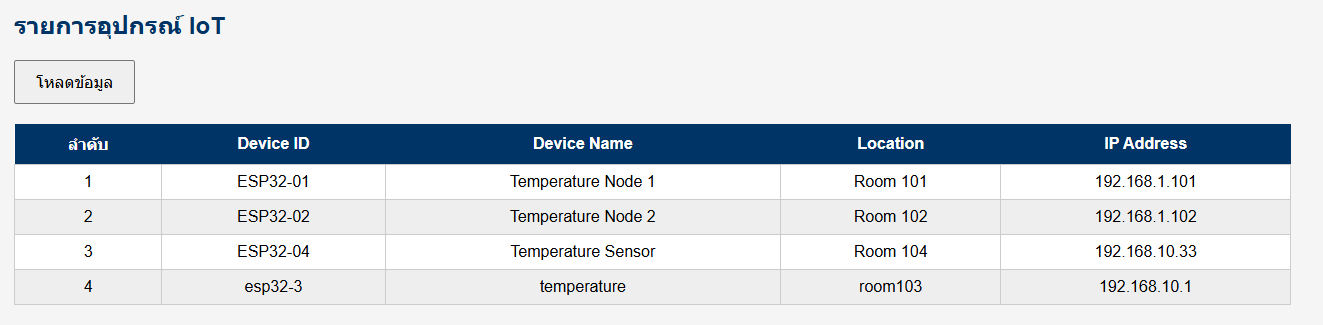
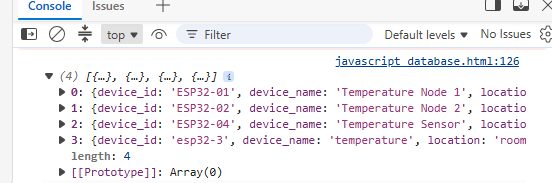
และให้ทดลองคลิ๊กที่ Console จะปรากฏข้อมูลที่ได้รับ Server ดังรูป
ให้สร้างหน้าเพจที่แสดงเมนู 2 ปุ่มกด คือปุ่มเพิ่มรายการอุปกรณ์ และปุ่ม แสดงรายการอุปกรณ์ โดยหากกดปุ่มเพิ่มรายการอุปกรณ์ให้ปรากฏหน้าเพจสำหรับการกรอกข้อมูลอุปกรณ์ และหากดปุ่มแสดงรายการอุปกรณ์ให้แสดงรายการอุปกรณ์ทั้งหมดที่บันทึกไว้จากฐานข้อมูล