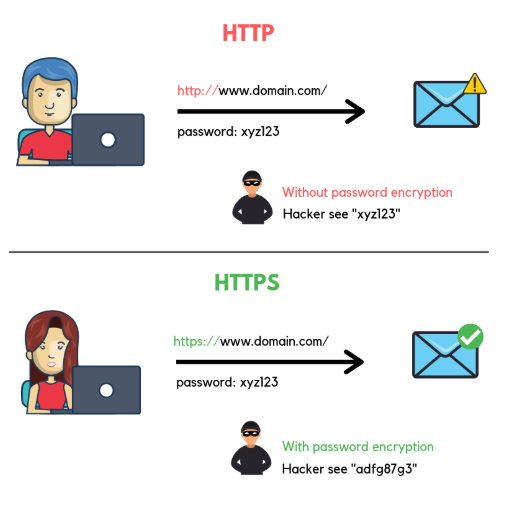
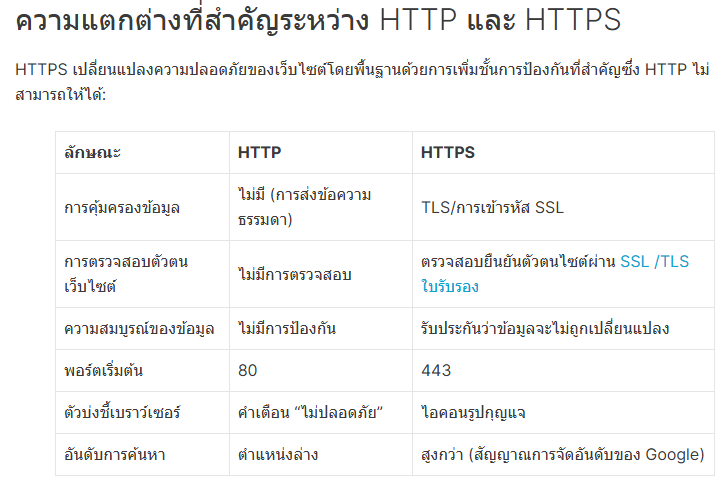
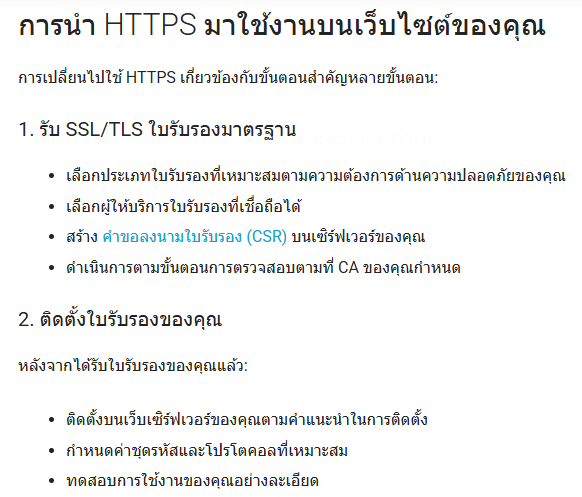
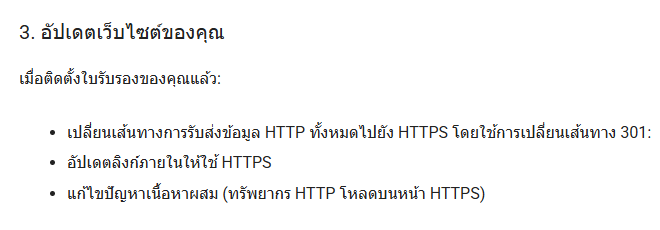
บทที่ 7
โปรโตคอล HTTP
โปรโตคอล HTTP (Hypertext Transfer Protocol) คือชุดกฎเกณฑ์ที่กำหนดรูปแบบการรับส่งข้อมูลบนอินเทอร์เน็ต เพื่อให้เบราว์เซอร์ (ไคลเอนต์) และเว็บเซิร์ฟเวอร์สามารถแลกเปลี่ยนข้อมูลและดึงข้อมูลต่างๆ บนเว็บ เช่น หน้าเว็บ รูปภาพ หรือวิดีโอ ได้อย่างถูกต้อง. HTTP ทำงานบนโมเดลไคลเอนต์-เซิร์ฟเวอร์ โดยไคลเอนต์จะส่งคำขอ (Request) ไปยังเซิร์ฟเวอร์ จากนั้นเซิร์ฟเวอร์จะส่งข้อความตอบกลับ (Response) ซึ่งประกอบด้วยรหัสสถานะและข้อมูลที่ร้องขอ กลับมาให้ไคลเอนต์.
หลักการทำงานของ HTTP
รูปแบบไคลเอนต์-เซิร์ฟเวอร์:
โดยเว็บเบราว์เซอร์ของคุณทำหน้าที่เป็นไคลเอนต์ และเว็บเซิร์ฟเวอร์ที่เก็บข้อมูลเว็บไซต์ทำหน้าที่เป็นเซิร์ฟเวอร์.
คำขอและการตอบกลับ (Request and Response):
คำขอ (HTTP Request): เมื่อคุณพิมพ์ URL หรือคลิกลิงก์ในเบราว์เซอร์ เบราว์เซอร์ของคุณจะส่งคำขอ HTTP ไปยังเซิร์ฟเวอร์เพื่อขอข้อมูลเฉพาะ. การตอบกลับ (HTTP Response): เมื่อเซิร์ฟเวอร์ได้รับคำขอ เซิร์ฟเวอร์จะประมวลผลและส่งการตอบกลับกลับมาให้ไคลเอนต์ ซึ่งอาจเป็นหน้า HTML, รูปภาพ หรือข้อมูลอื่นๆ. การตอบกลับมักจะมีรหัสสถานะ เช่น "200 OK" สำหรับการสำเร็จ หรือ "404 Not Found" สำหรับทรัพยากรที่หาไม่พบ.
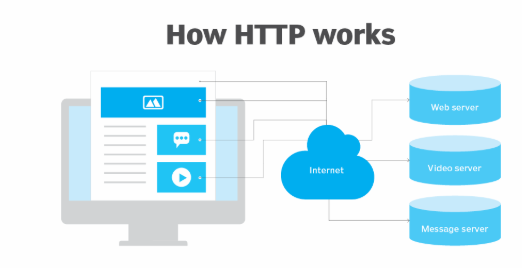
https://www.techtarget.com/whatis/definition/HTTP-Hypertext-Transfer-Protocol
A web server delivers website content to a user's web browser upon receiving such requests from the browser. A web browser is an HTTP client that sends requests for information to servers. The request -- which contains specific information, such as the HTTP version type, an HTTP method, HTTP request headers and HTTP body (optional) -- happens when the browser user enters file requests by either opening a web file by typing in a URL or clicking on a hypertext link. The browser builds the HTTP request and sends it to the Internet Protocol address (IP address) indicated by the URL.
HTTP Request
HTTP Request คือส่วนที่ Cilent ส่งข้อมูลคำขอไปยังตัว Sever เพื่อขอหรือถามข้อมูลที่ต้องการให้แสดงบน webpage บนตัว Client ข้อมูลที่ส่ง Client ส่งมายัง Server มีดังนี้
version HTTP, HTTP/2 and HTTP/3 are the versions currently available.
HTTP method: he method indicates the specific action the request expects to receive from the server when it responds.
URL: ตำแหน่งของเว็บ หรือไฟล์ที่ต้องการ
HTTP Header: กำหนดข้อมูลชนิดของ Browser ที่ใช้รวมไปถึง Cookie ของ Website
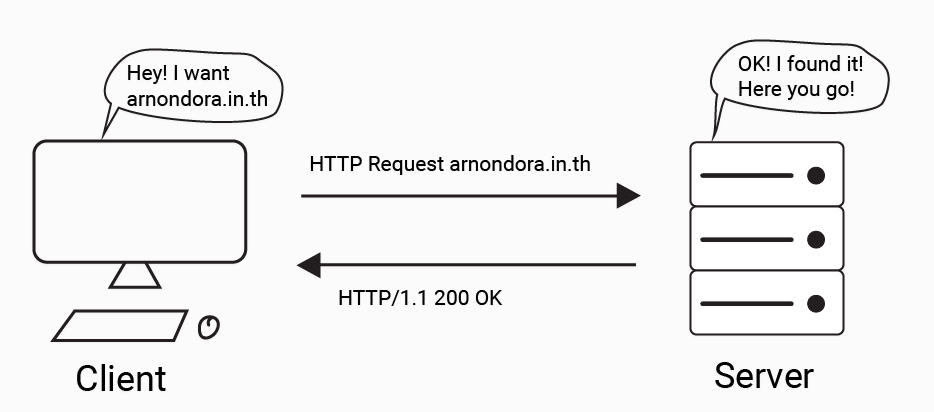
https://arnondora.in.th/http2-future-modern-internet/
HTTP Response
HTTP Response คือส่วนที่ Cilent ส่งข้อมูลคำขอไปยังตัว Sever เพื่อขอหรือถามข้อมูลที่ต้องการให้แสดงบน webpage บนตัว Client ข้อมูลที่ส่ง Client ส่งมายัง Server มีดังนี้
HTTP Status code เป็นส่วนที่ระบุสถานะของ Website จากส่วนของ Cilent โดยจะรวมถึงสถานะสมบูรณ์ เปลี่ยนหน้าเว็บ ไม่พบหน้าเว็บเป็นต้น
HTTP Response headers: เป็นส่วนส่งข้อมูลและรับข้อมูลออกมา
HTTP Body: ข้อมูลสำเร็จจะส่งคำขอข้อมูลจาก HTML code เป็นหน้า website
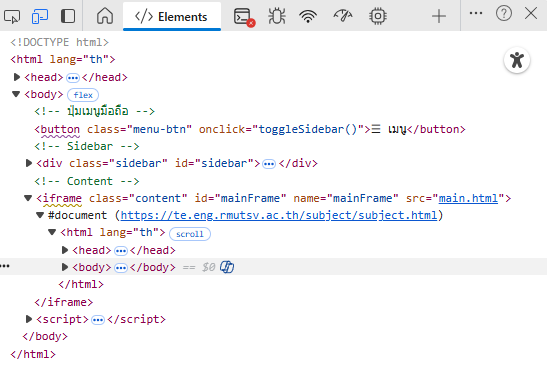
สมารถดูข้อมูลตอบกลับได้โดยการ คลิ๊กขวา แล้วเลือก Inspect ของหน้าเวปเพจ
An HTTP method. The method indicates the specific action the request expects to receive from the server when it responds.HTTP status codes
In response to HTTP requests, servers often issue response codes, indicating the request is being processed, there was an error in the request or that the request is being redirected. Here are some common response codes:
200 OK. This is one of the most common response codes; it means that the request, such as GET or POST, worked and is being acted upon.
300 Moved Permanently. The URL of the requested resource has been changed permanently.
401 Unauthorized. The client, or user making the request of the server, has not been authenticated to allow access to the requested information.
403 Forbidden. The client's identity is known but has not been given access authorization.
404 Not Found. The 404 error code means the URL is not recognized or the resource at the location does not exist.
500 Internal Server Error. The server has encountered a situation it doesn't know how to handle.
HTTP Method
HTTP Method คือประเภทของการร้องขอจากไคลแอนท์ ไปยังเซิฟเวอร์ ซึ่งมีประเภทดังนี้
GET:สำหรับขอข้อมูลจากเซิร์ฟเวอร์.
POST:สำหรับส่งข้อมูลไปยังเซิร์ฟเวอร์ เช่น การส่งข้อมูลฟอร์ม (ชื่อผู้ใช้, รหัสผ่าน) เพื่อสร้างทรัพยากรใหม่. ซึ่งเป็นการขอข้อมูลไปยังเซิฟเวอร์เช่นกัน แต่จะปกปิดข้อมูลที่ส่งไป ไม่เหมือน Method GET
PUT:สำหรับอัปเดตข้อมูลทั้งหมดที่มีอยู่ หรือสร้างทรัพยากรใหม่
PATCH:สำหรับอัปเดตข้อมูลทั้งหมดที่มีอยู่ หรือสร้างทรัพยากรใหม่
DELETE:สำหรับลบทรัพยากรบนเว็บเซิร์ฟเวอร์
ทำความรู้จัก HTTP Request