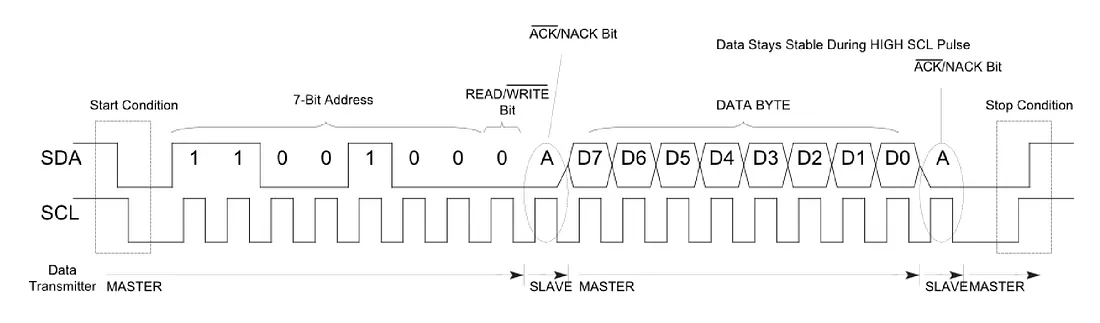
chapter 5
การสื่อสารอนุกรม
(Serial communication)
การสื่อสารอนุกรมในไมโครคอนโทรลเลอร์จะเป็นการสื่อสารสำคัญที่ใช้เพื่อการติดต่อสื่อสารกับอุปกรณ์ต่อพ่วงต่าง ๆ เช่นการสื่อสารกับคอมพิวเตอร์ผ่านพอร์ตอนุกรม สำหรับการอัปโหลด หรือการส่ง รับ ข้อมูลระหว่างคอมพิวเตอร์กับ บอร์ดอะดูลโน่ หรือการสื่อสารกับเซนเซอร์ อุปกรณ์แสดงผล เป็นต้น
การสื่อสารอนุกรม ข้อมูลจะถูกส่งออกไปยังตัวรับแบบเรียงตามลำดับอนุกรม ซึ่งข้อมูลจะอยู่ในรูปแบบเลขฐานสอง คือ 0 และ 1 และจะถูกแปลงเป็นสัญญาณส่งผ่านตัวกลางที่มีระยะทางที่มากขึ้นผ่านสายไฟที่เป็นทองแดงไปยังอุปกรณ์ตัวรับ โดยมีการควบคุมอัตราความเร็วหรือปริมาณข้อมูลต่อเวลา 1 วินาที (ฺBit Rate) ซึ่งจะมีกระบวนการซิ่งโครไนซ์กับจังเวลาของสัญญาณนาฬิกา(synchronous) หรือแบบไม่ต้องใช้สัญญาณนาฬิกา (asynchronous) แต่จะใช้ช่วงของเวลาแทน
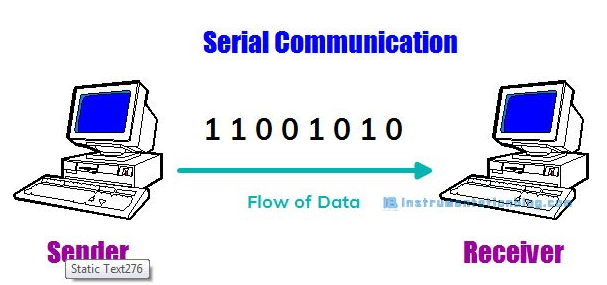
การสื่อสารแบบอนุกรมที่นิยมใช้กัน เช่น การสื่อสารอนุกรมด้วยพอร์ต RS232 การสื่อสารอนุกรมแบบ RS485 การสื่อสารแบบ SPI หรือแบบ I2C เป็นต้น
How are Serial Communication work
Bit คือข้อมูลขนาดเล็กสุดของการสื่อสาร โดยจำนวน 1 บิตสามารถเก็บข้อมูล ได้แค่ 2 ค่าเท่านั้น คือ 1s และ 0s ซึ่งในการสื่อสารอนุกรมจะต้องส่งข้อมูลเหล่านี้ไปยังตัวรับซึ่งมีระยะทางห่างออกไปผ่านทางตัวกลาง ในลักษณะอนุกรม คือการส่งออกไปครั้งละบิต (Serial) โดยตัวรับจะรับคราวละบิตเช่นเดียวกัน และนำข้อมูลที่รับมาแต่ละบิตมารวมกันให้ได้เป็นไบต์ (8บิต) และรวมกันหลาย ๆ ไบต์จนกลายเป็นข้อมูลที่ได้รับ
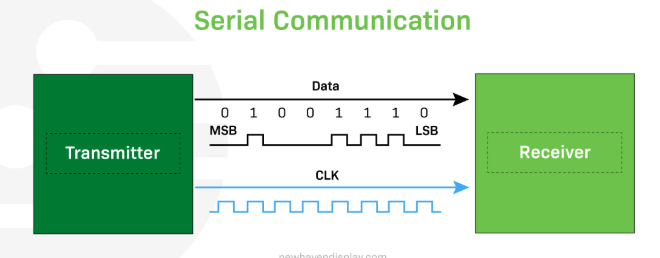
กระบวนการส่งข้อมูลแบบอนุกรมแต่ละครั้งจะประกอบด้วยขั้นตอนดังนี้
1. Start of communication: อุปกรณ์ตัวส่ง จะต้องส่งสัญญาณเริ่มต้นการสื่อสาร (start bit) เพื่่อแจ่งให้ตัวรับทราบว่าจะมีการเริ่มต้นส่งสัญญาณไปยังตัวรับ (The start bit is like a heads-up, signaling, "Hey, I'm about to send some data.")
2. Data transmission: เป็นสัญญาณข้อมูลที่ต่อจากบิต Start ซึ่งอาจจะเป็นข้อมูล หรือข้อความที่ หรือตัวอักษรที่ต้องการส่ง
3. End of communication: เป็นสัญญาณแจ้งสิ้นสุดการส่ง (stop bit) เพื่อแจ้งให้ตัวรับทราบว่าสิ้นสุดการส่งข้อมูลสำหรับรอบนั้น ๆ ("That's it, I've sent everything I had to send.")
4. Error checking (optional): เป็นรหัสที่ตัวส่งแจ้งให้ตัวรับ นำไปตรวจเช็คกับข้อมูลที่ส่งไปนั้น ตัวรับรรับได้ถูกต้องหรือไม่ โดยส่วนใหญ่จะไช้การตรวจสอบแบบพาริตี้ (parity check) (If the data isn't correct, the receiver can ask the transmitter to resend the data.)
ประโยชน์ของการสื่อสารอนุกรม
- ใช้จำนวนสายน้อยแบบขนาน
- ระยะทางการสื่อสารได้ไกลกว่าแบบขนาน
- ลดสัญญาณรบกวนระหว่างสายจากภายใน (Crosstalk)
https://iotboys.com/how-does-serial-communication-works-in-arduino/ https://newhavendisplay.com/blog/serial-vs-parallel-communication/Serial communication can be either synchronous or asynchronous, depending on the protocol used. Asynchronous serial communication sends data one bit at a time, without a dedicated clock signal, relying on start and stop bits to frame each byte. Synchronous serial communication sends data in a continuous stream at a constant rate, requiring a shared or separate clock signal to synchronize the transmitting and receiving devices.
ประเภทของ Serial Communication
UART (Universal Asynchronous Receiver/Transmitter)
ใช้บิตเริ่มต้นและหยุดเพื่อกำหนดจังหวะ ไม่ต้องใช้สายนาฬิกา (Clock) เหมาะกับสายสัญญาณน้อย (เช่น UART) แต่เสี่ยงต่อความผิดพลาด.

การสื่อสารแบบอนุกรมระหว่างไมโครคอนโทรลเลอร์ช่วยให้สามารถส่ง (Tx) และรับ (Rx) ข้อมูลในลำดับบิตเดียว โดยมีบิตเริ่มต้นอยู่ด้านหน้าและบิตหยุดอยู่ด้านท้ายของข้อมูลทุกๆ แปดบิต (1 ไบต์) การถ่ายโอนข้อมูลโดยไม่ใช้สัญญาณนาฬิกาเรียกว่าแบบอะซิงโครนัส ตัวรับจะทราบจุดเริ่มต้นและจุดสิ้นสุดของข้อมูลโดยใช้บิตเริ่มต้นและบิตหยุด และยังมีบิตว่างบางส่วนสำหรับเว้นระยะห่างระหว่างข้อมูลด้วย

สำหรับการสื่อสารอนุกรมของไมโครคอนโทรลเลอร์จะมีทั้งการส่ง (Tx) และการรับ (Rx) พร้อมกันในเวลาเดียวกันได้ ซึ่งเป็นลักษณะการสื่อสารแบบ Full Duplex แยกการรับและการส่งสัญญาณอยู่คนละเส้นกัน

ตัวอย่างเช่น ต้องการออกแบบให้ไมโครคอนโทรลเลอร์ Arduino สามารถสื่อสารแลกเปลี่ยนข้อมูลกับ ESP32 ซึ่งทั้งคู่นั้นมีพอร์ตสื่อสารอนุกรม สามารถนำมาต่อวงจรได้ดังรูป
 https://theorycircuit.com/esp32-projects/arduino-and-esp32-serial-data-communication-setup/
Synchronous (ซิงโครนัส)
ใช้สัญญาณนาฬิกาควบคุมจังหวะการรับส่ง ลดความผิดพลาด แต่ต้องใช้สายสัญญาณมากกว่า (เช่น SPI, I2C).
This is the most common form of serial communication used in Arduino. UART communication is asynchronous and is typically used for communication between the Arduino board and other microcontrollers, sensors, and modules.
I2C (Inter-Integrated Circuit)
I2C is a synchronous serial communication protocol that allows multiple devices to communicate over a shared bus. It is commonly used for connecting sensors and displays to Arduino.
SPI (Serial Peripheral Interface)
SPI is another synchronous serial communication protocol that is used for high-speed communication between Arduino and devices like displays, memory chips, and other microcontrollers.
UART (Universal Asynchronous Receiver/Transmitter):
UART is the most common form of serial communication used in Arduino. It is asynchronous, which means that data is sent without a shared clock signal. Instead, both the sender and receiver agree on a set of parameters to determine the data rate and timing.
The key parameters in UART communication are:
Baud Rate: This defines the data transmission speed in bits per second (bps). Both the transmitter and receiver must use the same baud rate for successful communication.
Data Bits: The number of data bits in each byte of data. Common values are 8 bits, 7 bits, or 6 bits.
Stop Bits: Stop bits indicate the end of a data byte. Common values are 1 or 2 stop bits.
Parity: Parity bits are optional and can be used for error checking. Common options are no parity, even parity, or odd parity.
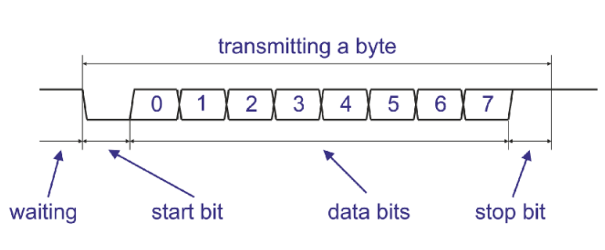
https://mypractic.com/lesson-12-serial-port-uart-in-arduino-serial-library-debugging-programs-on-arduino/
Baud Rate
The baud rate determines how quickly data is transmitted over the serial communication channel. It is specified in bits per second (bps). Common baud rates used in Arduino projects include 9600, 19200, 38400, and 115200 bps. Both the sender and receiver must use the same baud rate to communicate successfully.
Choosing the appropriate baud rate depends on factors such as the hardware capabilities of your devices and the required data transfer speed. Higher baud rates allow for faster data transfer but may require more precise timing and can be susceptible to noise and errors over longer distances.
Setting Up Serial Communication
Setting up hardware serial communication is straightforward on Arduino boards with built-in serial ports
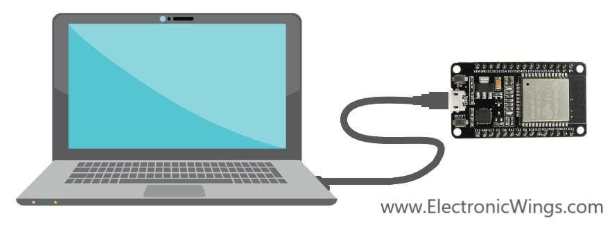
Unlike SPI or I2C, which are synchronous, UART is asynchronous, meaning it does not use a clock signal to synchronize the data transmission between devices. However, both devices must agree on the baud rate (speed of transmission).
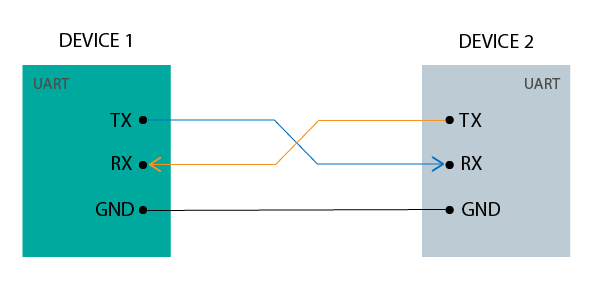
UART ports allow us to communicate with other devices, such as other microcontroller boards (an Arduino, an ESP8266, another ESP32 board, or others), the computer, sensors, GPS .
UART Interface
TX (Transmit): Sends data.
RX (Receive): Receives data.
GND GND: Common ground.
ESP32 UART Peripherals
The ESP32 supports up to three UART interfaces:UART0, UART1 b>, and UART2, depending on the ESP32 board model you’re using.
UART0 is usually reserved for communication with the serial monitor during upload and debugging. However, you can also use it for communication with other devices after uploading the code if the Serial Monitor is not needed.
UART1 and UART2: available to communicate with external devices.
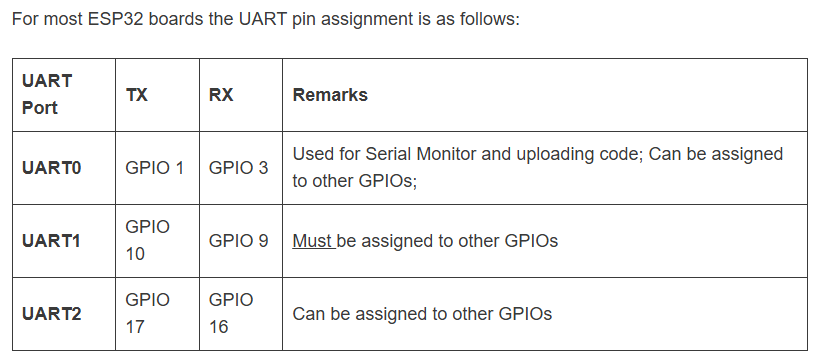
UART0 and the Serial Monitor
Relation Between UART0 and Serial Monitor. UART0 is the hardware port. Serial Monitor is the software tool on your computer.
When you open Serial Monitor, it connects to the COM port (Windows)
Microcontroller sends data → UART0 TX → USB cable → PC → Serial Monitor shows it.
PC sends data (you type in Serial Monitor) → USB → UART0 RX → Microcontroller receives it.
Setting up serial communication in software involves configuring the serial port with the appropriate settings. Here’s how you can do it in an Arduino sketch.
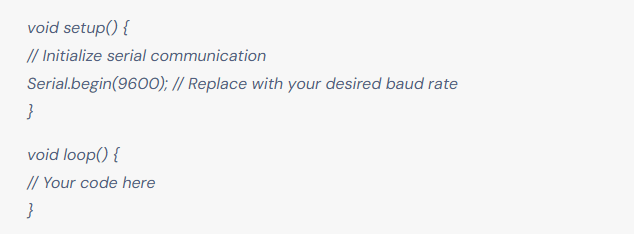
Serial.begin() initializes the serial communication with a specific baud rate. Replace 9600 with the baud rate you intend to use.
demostration in Wokwi
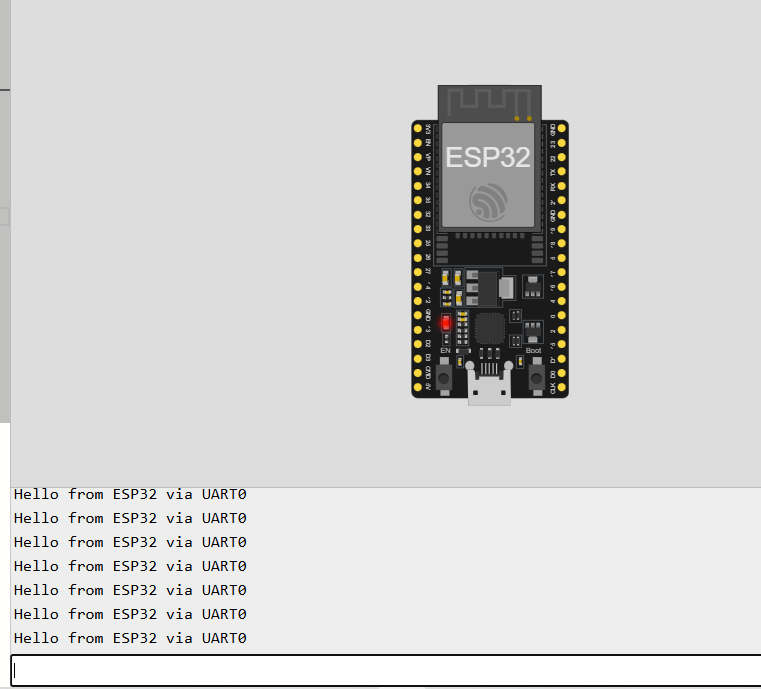
// ESP32 UART0 demo with Serial Monitor
// UART0 is the default "Serial" port connected to USB

void setup() {
  Serial.begin(115200);         // Start UART0
  Serial.println("UART0 Ready!"); // First message to Serial Monitor
}

void loop() {
  // Send data to Serial Monitor
  Serial.println("Hello from ESP32 via UART0");
  delay(1000);

  // If user types something in Serial Monitor, read it
  if (Serial.available() > 0) {
    String input = Serial.readStringUntil('\n');
    Serial.print("You typed: ");
    Serial.println(input);
  }
}