การควบคุม GPIO
การควบคุม GPIO (General Purpose Input/Output) บนบอร์ด ESP32 สำหรับรับส่งสัญญาณดิจิทัลทำได้ง่ายผ่าน Arduino IDE โดยกำหนดโหมดด้วยคำสั่ง pinMode() สั่งจ่ายไฟ (Output) ด้วย digitalWrite() และอ่านค่าแรงดัน (Input) ด้วย digitalRead()
โดยการตั้งค่าเพื่อกำหนดให้ GPIO ทำหน่าที่เป็นอินพุตหรือเอาท์พุตด้วยการใช้คำสั่ง pinMode(); ในฟังก์ชัน Setup()
pinMode(GPIO_PIN, OUTPUT); // สำหรับขา Output
pinMode(GPIO_PIN, INPUT); // สำหรับขา Input
เช่น
pinMode(4, OUTPUT); // กำหนดขา GPIO02 ทำหน้าที่เป็นเอาท์พุต
การควบคุม GPIO ทำหน้่าที่เป็นเอาท์พุต
GPIO Out (General Purpose Input/Output Output) คือ การตั้งค่าให้ขาของไมโครคอนโทรลเลอร์ (เช่น ESP32 หรือ Arduino) ทำหน้าที่เป็น "ฝ่ายจ่ายไฟ" หรือ "ส่งสัญญาณ" ออกไปภายนอก เพื่อควบคุมอุปกรณ์ต่างๆ เช่นการควบคุมหลอด LED ดังในรูป
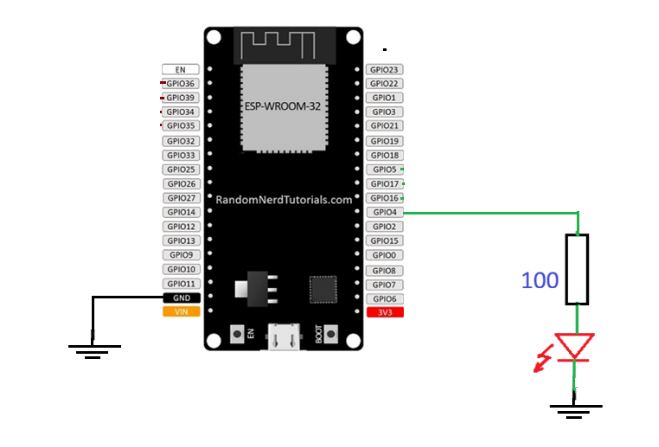
โดยหาก เมื่อตั้งค่าขาเป็น Output จะสามารถสั่งงานหลักได้ 2 สถานะ ผ่านคำสั่ง digitalWrite() คือ
- HIGH: จ่ายแรงดันไฟฟ้าออกมาสูงสุด (สำหรับ ESP32 คือ 3.3V / สำหรับ Arduino บางรุ่นคือ 5V) เพื่อสั่งให้เปิดอุปกรณ์
- LOW: ลดแรงดันไฟฟ้าลงเหลือ 0V (ต่อลงกราวด์) เพื่อสั่งให้ปิดอุปกรณ์
อุปกรณ์ที่นิยมนำมาต่อกับ GPIO Out หลอดไฟ LED: สั่งให้ติด (HIGH) หรือดับ (LOW) บัซเซอร์ (Buzzer): สั่งให้ส่งเสียงเตือน ลอจิกเกต / โมดูลขับมอเตอร์: ส่งสัญญาณพัลส์ (เช่น PWM) เพื่อควบคุมความเร็วหรือทิศทางมอเตอร์ รีเลย์ (Relay): สั่งเปิด-ปิดสวิตช์ไฟฟ้าขนาดใหญ่ (เช่น ปั๊มน้ำ, ไฟบ้าน) แต่หากกระแสที่จ่ายมากกว่า 20 mA จะต้องใช้วงจรขับกระแสเพิ่มเติม
จากรูปจะเขึยนโปรแกรมควบคุมให้ LED ที่ต่อที่่ขา GPIO4 ดิด-ดับ สลับการเป็นเวลา 500 mS สามารถเขียนคำสั่ง ดังนี้
const int led1 =  4;    // กำหนดขา GPIO ให้มีชื่อเรียกเป็น led1

void setup() {
  Serial.begin(115200);
  pinMode(led1, OUTPUT);   // กำหนดให้ led1 ทำหน้าที่เป็นเอาท์พุต
}

void loop() {

       digitalWrite(led1, HIGH);  // สั่ง led ติด
       delay(500);    // หน่วงเวลา 500 mS
       digitalWrite(led1, LOW);   // สั่ง led ดับ
       delay(500);    // หน่วงเวลา 500 mS
}
ให้ทดลองจำลองการต่อวงจรและนำโค้ดจากตัวอย่างไปทดลองใน Wokwi
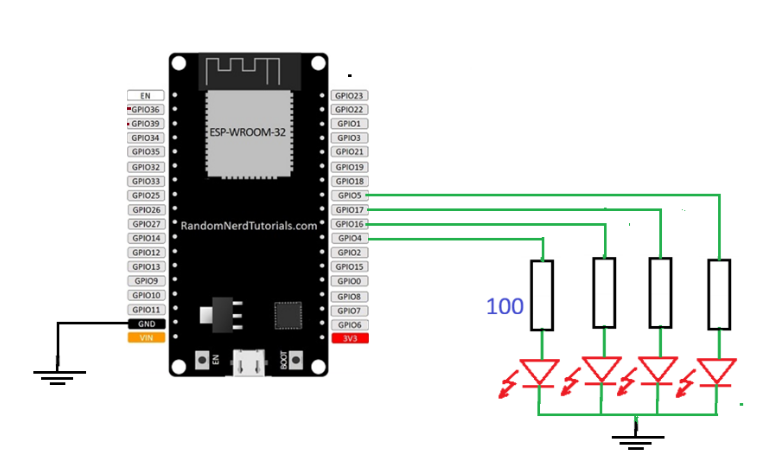
และให้เพิ่มจำนวน LED ต่อที่ขา GPIO ต่างดังวงจร และเขียนโค้ดคำสั่งควบคุมให้ LED ติดสว่างเรียงกันทีละดวง ระยะเวลาห่างกัน 500mS เมื่อสว่างทั้งหมด ให้ดับ พร้อมกัน แล้วเริ่มต้นติดทีละดวงใหม่ วนไปไม่รู้จบ
Switch Input
การอ่านอินพุตจาก switch
การอ่านค่าอินพุตจากสวิทช์ มีลักษณะเป็นการอ่านค่าแบบดิจิทัล ซึ่งเป็นการอ่านค่าระดับลอจิกของแรงดันตกคร่อมสวิทช์ แล้วแปลงเป็นค่าลอจิก 0 หรือ 1 โดยการใช้งานสวิทช์ในงานไมโครคอนโทรลเลอร์มักจะถูกนำมาใช้สำหรับการกดปุ่มเพื่อเลือกรายการจากเมนู หรือการสั่งการด้วยสวิทช์์ ซึ่งมักจะเป็นสวิทช์แบบ Push Button คือกดติด ปล่อยดับ
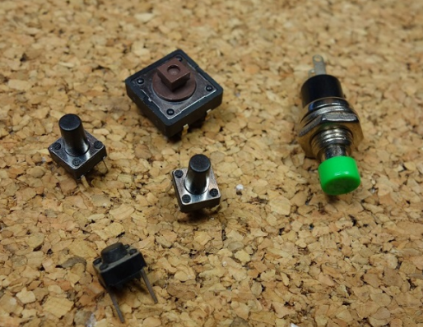
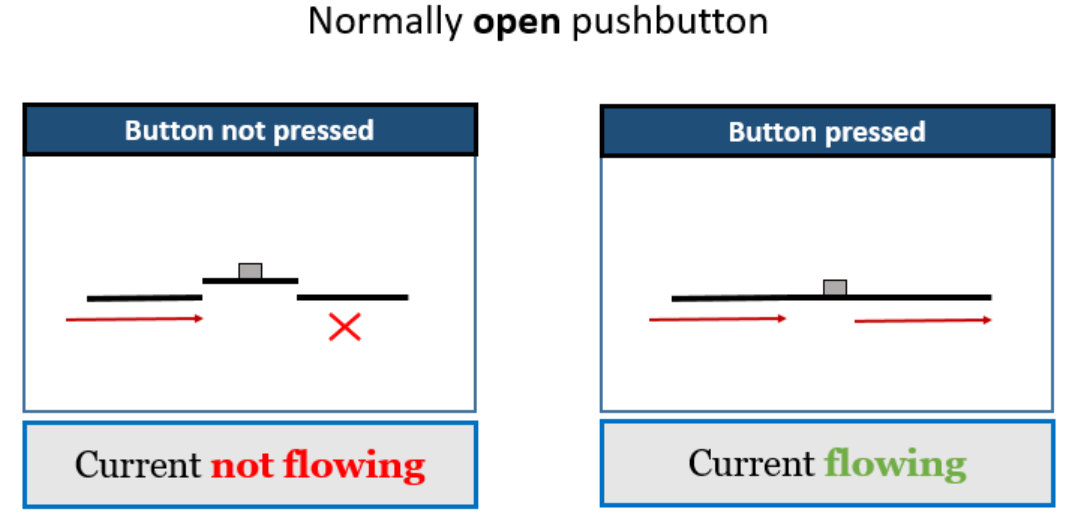
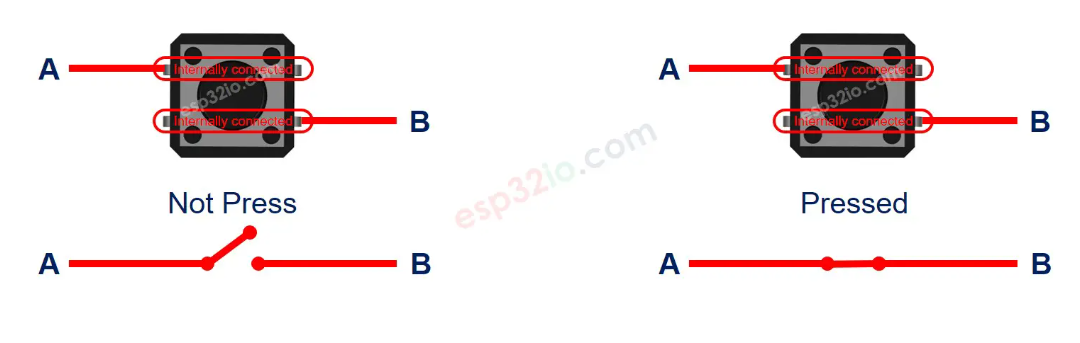
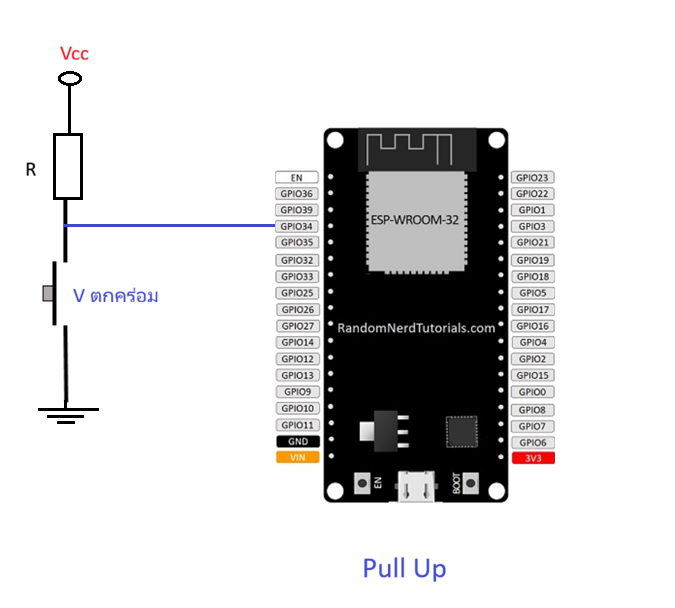
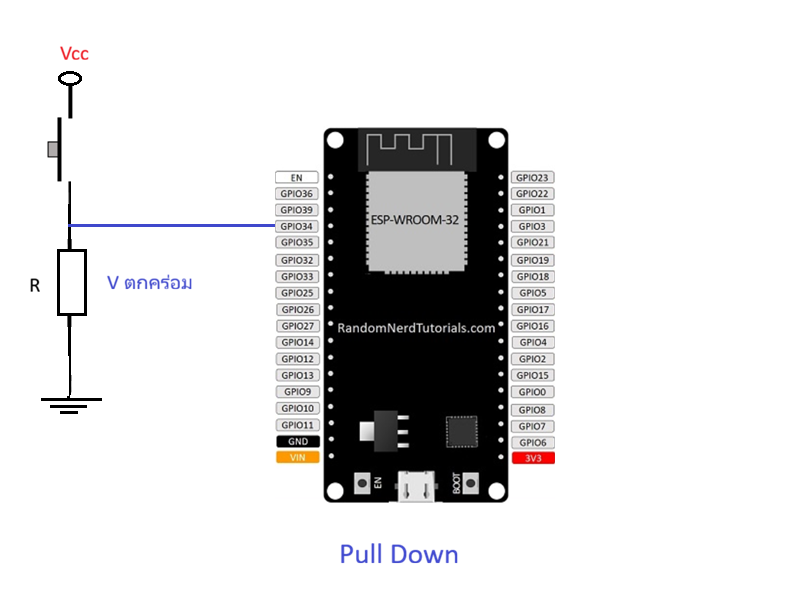
การต่อใช้งานสวิทช์กับไมโครคอนโทรลเลอร์จะมี 2 แบบ คือ
1. แบบ Pull up
2. แบบ Pull down
การทดลอง
หากต้องการให้ไมโครคอนโทรลเลอร์ ESP32 รับค่าการกดสวิทช์จากขา 34 โดยต่อสวิทช์แบบ Pull up เมื่อกด sw ให้ไฟ LED ซึ่งต่อยู่ที่ขา GPIO4 สว่าง หากปล่อย sw ให้ LED ดับ โดยมีวงจรดังรูป
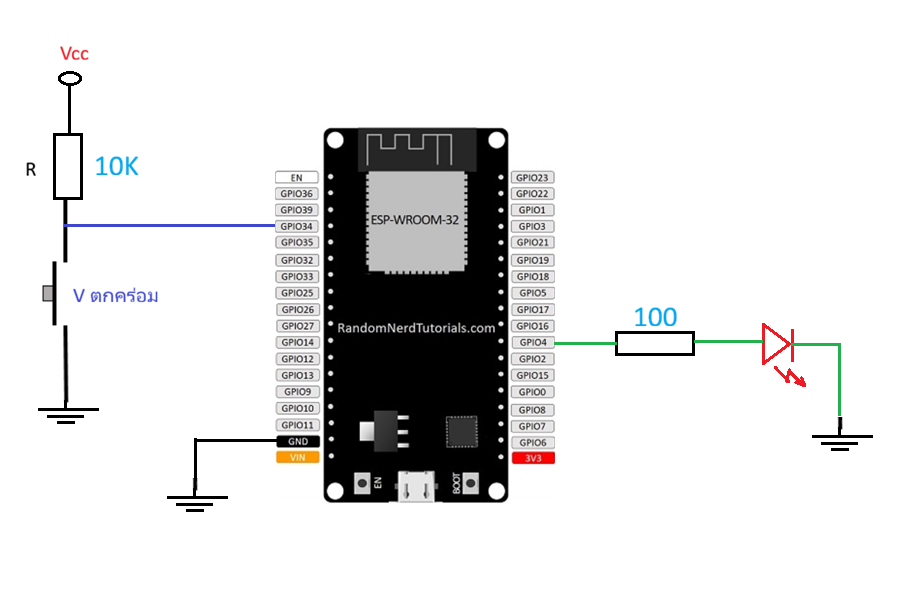
นำวงจรไปต่อในโปรแกรมจำลอง wokwi ได้ดังนี้
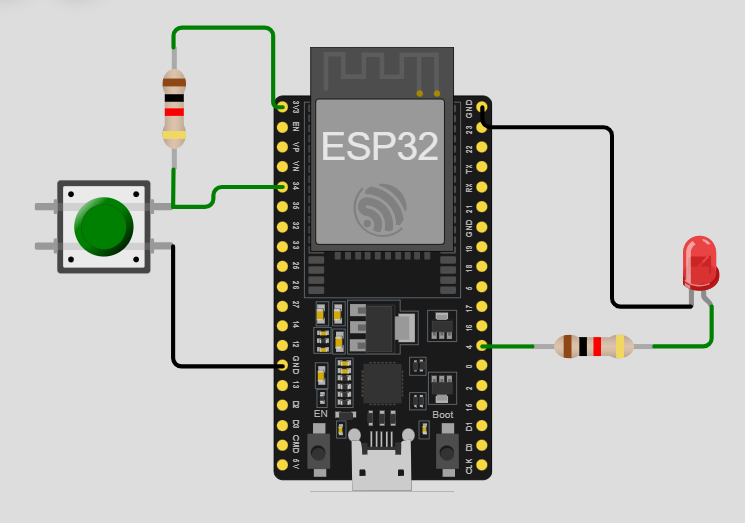
นำโค้ดจากตัวอย่างไปวางใน Wokwi
const int buttonPin = 34;  // the number of the pushbutton pin
const int ledPin =  4;    // the number of the LED pin

// variable for storing the pushbutton status
int buttonState = 0;

void setup() {
  Serial.begin(115200);
  pinMode(buttonPin, INPUT);
  pinMode(ledPin, OUTPUT);
}

void loop() {

  buttonState = digitalRead(buttonPin);
  Serial.println(buttonState);
  if (buttonState == LOW) {
       digitalWrite(ledPin, HIGH);
  } else {
       digitalWrite(ledPin, LOW);
  }
}
จากตัวอย่าง จงเขียนโค้ดอ่านค่า sw 4 ตัว เพื่อควบคุมการกด sw แล้วใหิ LED แต่ละตัว สว่างตามการกด sw โดยมีวงจรดังรูป
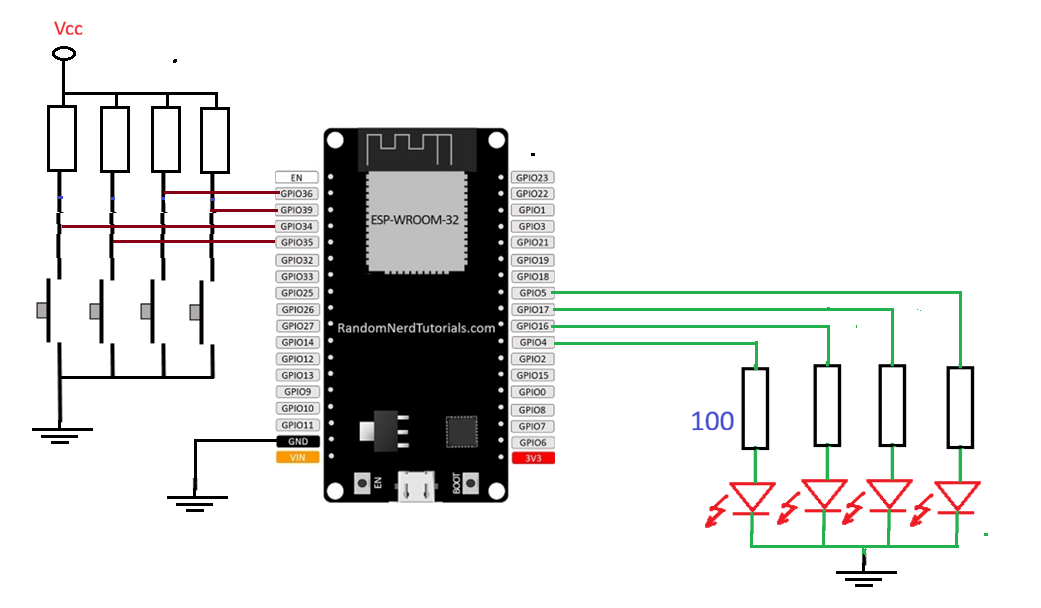
https://randomnerdtutorials.com/esp32-pinout-reference-gpios/ https://randomnerdtutorials.com/esp32-digital-inputs-outputs-arduino/